
base_url()
La funció base_url() pertany al helper URL i permet gestionar les rutes i els enllaços dins del projecte web. La principal funcionalitat d'aquesta funció és la de retornar l'adreça base del lloc web, permetent que els enllaços generats siguin portables i funcionin correctament independentment d'on es trobi l'aplicació, per exemple en un entorn local retornarà http://localhost i en el desplegament retornarà https://elmeudomini.com
Les aplicacions i funcionalitats principals són:
- Enllaçament d'Assets: Aquesta és la funcionalitat més comuna i important de
base_url(). Permet enllaçar correctament a fitxers CSS, JavaScript, imatges i altres recursos multimèdia que es troben dins del directori public (o els seus subdirectoris). Sense base_url(), hauries de codificar rutes absolutes o relatives que podrien trencar-se si canvies la ubicació del teu projecte.
<link rel="stylesheet" href="<?= base_url('css/estils.css') ?>">
<script src="<?= base_url('js/script.js') ?>"></script>
<img src="<?= base_url('images/logo.png') ?>" alt="Logotip">- Generació d'Enllaços Interns: Tot i que
site_url()és més adequat per a enllaços a controladors i mètodes dins de la teva aplicació (ja que inclou index.php i el url_suffix si estan configurats),base_url()es pot utilitzar per crear enllaços a rutes directes o a seccions específiques de l'aplicació que no necessiten passar pel controlador principal.
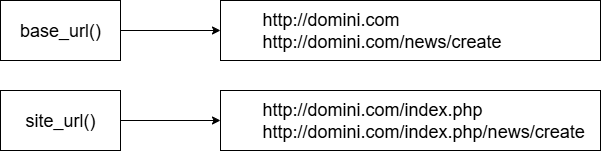
- Portabilitat i Flexibilitat: La funcionalitat clau de base_url() és fer que la teva aplicació sigui portable. En lloc de codificar URLs de manera "hardcoded" (com
http://localhost/elmeuprojecte/),base_url()obté dinàmicament la URL base configurada aapp/Config/App.php(variable$baseURL). Això significa que pots moure el teu projecte entre diferents servidors o subdirectoris sense necessitat de modificar cada enllaç manualment.
app/Config/App.php
<?php

namespace Config;

use CodeIgniter\Config\BaseConfig;

class App extends BaseConfig
{
    /**
     * --------------------------------------------------------------------------
     * Base Site URL
     * --------------------------------------------------------------------------
     *
     * URL to your CodeIgniter root. Typically, this will be your base URL,
     * WITH a trailing slash:
     *
     * E.g., http://example.com/
     */
    public string $baseURL = 'https://elmeuprojecte.com/';

    /**
     * Allowed Hostnames in the Site URL other than the hostname in the baseURL.
     * If you want to accept multiple Hostnames, set this.
     *
     * E.g.,
     * When your site URL ($baseURL) is 'http://example.com/', and your site
     * also accepts 'http://media.example.com/' and 'http://accounts.example.com/':
     *     ['media.example.com', 'accounts.example.com']
     *
     * @var list<string>
     */
    public array $allowedHostnames = [];

    /**
     * --------------------------------------------------------------------------
     * Index File
     * --------------------------------------------------------------------------
     *
     * Typically, this will be your `index.php` file, unless you've renamed it to
     * something else. If you have configured your web server to remove this file
     * from your site URIs, set this variable to an empty string.
     */
   public string $indexPage = 'index.php';  // site_url() => http://localhost:port/index.php

   // public string $indexPage = '';              // site_url() => http://localhost:port/
                                                  // base_url() => http://localhost:port/

    /**
     * --------------------------------------------------------------------------
     * URI PROTOCOL
     * --------------------------------------------------------------------------
     *
     * This item determines which server global should be used to retrieve the
     * URI string. The default setting of 'REQUEST_URI' works for most servers.
     * If your links do not seem to work, try one of the other delicious flavors:
     *
     *  'REQUEST_URI': Uses $_SERVER['REQUEST_URI']
     * 'QUERY_STRING': Uses $_SERVER['QUERY_STRING']
     *    'PATH_INFO': Uses $_SERVER['PATH_INFO']
     *
     * WARNING: If you set this to 'PATH_INFO', URIs will always be URL-decoded!
     */
    public string $uriProtocol = 'REQUEST_URI';

    /*
    |--------------------------------------------------------------------------
    | Allowed URL Characters
    |--------------------------------------------------------------------------
    |
    | This lets you specify which characters are permitted within your URLs.
    | When someone tries to submit a URL with disallowed characters they will
    | get a warning message.
    |
    | As a security measure you are STRONGLY encouraged to restrict URLs to
    | as few characters as possible.
    |
    | By default, only these are allowed: `a-z 0-9~%.:_-`
    |
    | Set an empty string to allow all characters -- but only if you are insane.
    |
    | The configured value is actually a regular expression character group
    | and it will be used as: '/\A[<permittedURIChars>]+\z/iu'
    |
    | DO NOT CHANGE THIS UNLESS YOU FULLY UNDERSTAND THE REPERCUSSIONS!!
    |
    */
    public string $permittedURIChars = 'a-z 0-9~%.:_\-'; //áéíóúàèìòùâêîôûãõñç

    /**
     * --------------------------------------------------------------------------
     * Default Locale
     * --------------------------------------------------------------------------
     *
     * The Locale roughly represents the language and location that your visitor
     * is viewing the site from. It affects the language strings and other
     * strings (like currency markers, numbers, etc), that your program
     * should run under for this request.
     */
    public string $defaultLocale = 'ca';

    /**
     * --------------------------------------------------------------------------
     * Negotiate Locale
     * --------------------------------------------------------------------------
     *
     * If true, the current Request object will automatically determine the
     * language to use based on the value of the Accept-Language header.
     *
     * If false, no automatic detection will be performed.
     */
    public bool $negotiateLocale = false;

    /**
     * --------------------------------------------------------------------------
     * Supported Locales
     * --------------------------------------------------------------------------
     *
     * If $negotiateLocale is true, this array lists the locales supported
     * by the application in descending order of priority. If no match is
     * found, the first locale will be used.
     *
     * IncomingRequest::setLocale() also uses this list.
     *
     * @var list<string>
     */
    public array $supportedLocales = ['ca','es'];

    /**
     * --------------------------------------------------------------------------
     * Application Timezone
     * --------------------------------------------------------------------------
     *
     * The default timezone that will be used in your application to display
     * dates with the date helper, and can be retrieved through app_timezone()
     *
     * @see https://www.php.net/manual/en/timezones.php for list of timezones
     *      supported by PHP.
     */
    public string $appTimezone = 'UTC';

    /**
     * --------------------------------------------------------------------------
     * Default Character Set
     * --------------------------------------------------------------------------
     *
     * This determines which character set is used by default in various methods
     * that require a character set to be provided.
     *
     * @see http://php.net/htmlspecialchars for a list of supported charsets.
     */
    public string $charset = 'UTF-8';

    /**
     * --------------------------------------------------------------------------
     * Force Global Secure Requests
     * --------------------------------------------------------------------------
     *
     * If true, this will force every request made to this application to be
     * made via a secure connection (HTTPS). If the incoming request is not
     * secure, the user will be redirected to a secure version of the page
     * and the HTTP Strict Transport Security (HSTS) header will be set.
     */
    public bool $forceGlobalSecureRequests = false;

    /**
     * --------------------------------------------------------------------------
     * Reverse Proxy IPs
     * --------------------------------------------------------------------------
     *
     * If your server is behind a reverse proxy, you must whitelist the proxy
     * IP addresses from which CodeIgniter should trust headers such as
     * X-Forwarded-For or Client-IP in order to properly identify
     * the visitor's IP address.
     *
     * You need to set a proxy IP address or IP address with subnets and
     * the HTTP header for the client IP address.
     *
     * Here are some examples:
     *     [
     *         '10.0.1.200'     => 'X-Forwarded-For',
     *         '192.168.5.0/24' => 'X-Real-IP',
     *     ]
     *
     * @var array<string, string>
     */
    public array $proxyIPs = [];

    /**
     * --------------------------------------------------------------------------
     * Content Security Policy
     * --------------------------------------------------------------------------
     *
     * Enables the Response's Content Secure Policy to restrict the sources that
     * can be used for images, scripts, CSS files, audio, video, etc. If enabled,
     * the Response object will populate default values for the policy from the
     * `ContentSecurityPolicy.php` file. Controllers can always add to those
     * restrictions at run time.
     *
     * For a better understanding of CSP, see these documents:
     *
     * @see http://www.html5rocks.com/en/tutorials/security/content-security-policy/
     * @see http://www.w3.org/TR/CSP/
     */
    public bool $CSPEnabled = false;
}
Dins d'aquest arxiu es troba també el paràmetre $indexPage que serveix per definir l'arxiu principal de l'aplicació. En molts servidors web, quan s'accedeix a una carpeta sense especificar un arxiu (per defecte busca l'arxiu index.html o index.php. En el cas de codeigniter el loarder principal del framework es troba en un arxiu que s'anomena index.php. Aquest paràmetre també serveix per la instrucció site_url() que ens mostra l'adreça base del projecte més l'arxiu indicat a $indexPage.
En resum, $indexPage controla si el nom del fitxer d'entrada de la teva aplicació apareix a les URLs. Si el deixes buit, CodeIgniter intentarà eliminar-lo de les URLs, depenent de la configuració del servidor web (segons configuració .htaccess o similars).
Aquests paràmetres també es poden definir dins l'arxiu de configuració del desenvolupament anomenat .env
app.baseURL = 'http://localhost'L'arxiu .env (de "environment", entorn) és un fitxer de configuració que s'utilitza per emmagatzemar variables d'entorn específiques per a la teva aplicació. La seva funció principal és separar la configuració sensible o que varia segons l'entorn (desenvolupament, proves, producció) del codi base de l'aplicació.
Per a què serveix l'arxiu .env?
- Seguretat: Permet mantenir informació sensible, com ara credencials de bases de dades, claus API o contrasenyes, fora del control de versions (Git) i del codi públic. Això és crucial per evitar que aquesta informació es filtri si el teu codi es fa públic.
- Flexibilitat: Facilita la gestió de configuracions diferents per a cada entorn. Per exemple, pots tenir una base de dades de desenvolupament local i una de producció remota, i configurar-les fàcilment canviant només l'arxiu .env corresponent.
- Portabilitat: Simplifica el desplegament de l'aplicació en diferents servidors o entorns, ja que només cal actualitzar el fitxer .env per adaptar-lo a les noves configuracions sense modificar el codi.
Prioritats de les Variables en CodeIgniter
En CodeIgniter, les variables definides a l'arxiu .env tenen una alta prioritat en el sistema de configuració. Això significa que si una variable es defineix tant a l'arxiu .env com en un altre fitxer de configuració (per exemple, Config/Database.php o Config/App.php), la versió del .env prevaldrà.
L'ordre de prioritat general per a la càrrega de configuracions en CodeIgniter és:
- Variables d'entorn del sistema operatiu: Aquestes tenen la màxima prioritat. Si defineixes una variable d'entorn directament al teu sistema operatiu (per exemple, mitjançant export en Linux/macOS o les variables d'entorn del sistema en Windows), CodeIgniter la llegirà abans que qualsevol altra font.
- Arxiu .env: Les variables definides en aquest fitxer són les següents en prioritat. Són ideals per a configuracions de cada projecte que no vulguis que siguin part del control de versions.
- Fitxers de configuració de l'aplicació (p. ex.,
Config/App.php,Config/Database.php, etc.): Aquests fitxers contenen la configuració per defecte de l'aplicació. Les variables definides aquí seran sobreescrites per les del .env o les variables d'entorn del sistema.
En resum, si vols assegurar-te que una configuració específica prevalgui, la millor pràctica és definir-la a l'arxiu .env (o directament com a variable d'entorn del sistema si és una configuració molt global o específica del servidor). Això proporciona una manera robusta i segura de gestionar la configuració de la teva aplicació CodeIgniter.